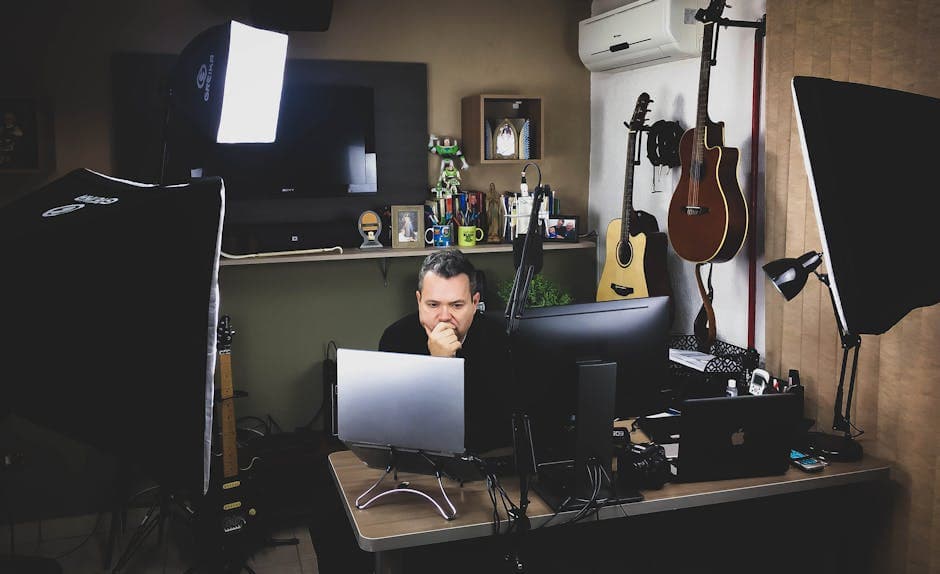
A recruiter may never say, “Your backlighting made you look unprepared,” but that impression can still land. In a virtual interview, background lighting changes how confident, clear, and trustworthy you appear within seconds. If your face is shadowed, your camera keeps adjusting, or bright windows wash out the frame, interviewers spend precious attention decoding your image instead of listening to your answer. That is why lighting is not a cosmetic detail. It is a communication tool.
What Your Lighting Communicates Before You Speak
Interviewers are not grading your apartment decor or expecting studio gear. They are, however, reacting to what your setup suggests about professional judgment, attention to detail, and readiness for remote communication. In video calls, people form fast impressions from visual cues, and lighting is one of the strongest.
Poor lighting can unintentionally signal:
- Low preparation
- Weak executive presence
- Distracting communication style
- Limited comfort with remote collaboration
- A lack of polish in client-facing situations
Good lighting, by contrast, makes you look:
- Present and engaged
- Easy to read emotionally
- More composed under pressure
- Clearer and more credible on camera
This matters because interviewers are often asking themselves a silent question: “Can I picture this person in meetings with teammates, customers, or leadership?” If your visual presence feels chaotic, that answer gets harder.
"I wanted to make sure my setup was clear and distraction-free so we could focus on the conversation."
That simple mindset is the goal. You are not building a set. You are reducing friction.
Why Background Lighting Quietly Lowers Hireability
The phrase hireability rating sounds abstract, but in practice it is the sum of dozens of small judgments: clarity, confidence, professionalism, warmth, and how easy it feels to interact with you. Lighting affects all of them at once.
It Steals Attention From Your Answers
If an interviewer has to strain to see your expression, your communication becomes harder to process. That is especially costly during behavioral answers, where your facial expression reinforces sincerity and confidence.
It Makes You Look Less Certain Than You Are
Harsh shadows can make you appear tense. Bright backlighting can turn you into a silhouette. Flickering or uneven light can make you seem distracted even when your answer is strong. None of those effects reflect your skill, but they still shape perception.
It Creates Technical Friction
Bad lighting forces webcams to auto-correct constantly. That can produce exposure shifts, blur, and graininess. The result feels subtly unstable. Interviewers may not know why the interaction feels off, but they feel it.
It Weakens Trust in Remote Readiness
For hybrid and remote roles, your video presence is part of the job. A clean setup signals digital professionalism. If you want a broader breakdown of that idea, the article on Nailing Your Online Setup: Lighting, Sound, and the "Digital First Impression" pairs well with this one.
The Fastest Lighting Fixes You Can Make Tonight
You do not need to buy anything expensive. Most candidates can dramatically improve their setup in 15 minutes or less by changing position, not equipment.
Face The Light Source
The best rule is simple: light should hit your face from the front, slightly above eye level. A window in front of you is usually better than a window behind you.
Do this:
- Put your laptop or webcam facing a window if possible.
- Sit about an arm’s length away so the light is soft, not blinding.
- If the sunlight is too harsh, diffuse it with a sheer curtain.
Avoid this:
- Bright window behind you
- Strong overhead-only lighting
- Side lighting that leaves half your face in shadow
Add A Simple Front Light If Needed
If natural light is unavailable, place a lamp behind your camera, aimed indirectly toward your face. Even a basic desk lamp can help if you soften it with distance or bounce it off a wall.
The ideal effect is even illumination, not brightness. You should look clear, not shiny.
Separate Yourself From The Background
When your background is very dark and your face is dim, the whole frame looks flat. A little separation helps. Try:
- Sitting a few feet away from the wall
- Turning on a soft lamp in the background
- Avoiding bright lights directly visible in frame
This creates depth and makes you appear more polished without looking staged.
How To Test Your Setup Like An Interviewer Would
Most candidates check whether they are visible. Strong candidates check whether they are easy to watch. That is a different standard.
Use this quick pre-interview test:
- Open your video platform and record a 60-second answer.
- Watch with sound off first.
- Ask: Can I clearly see my eyes, expressions, and face shape?
- Then watch with sound on and check for distracting exposure changes.
- Join the call from the same device, same room, same time of day you will use for the interview.
Look specifically for these issues:
- Does your face look darker than the background?
- Does the camera keep brightening and dimming?
- Are your glasses reflecting the light source?
- Do you disappear into the wall behind you?
- Do you look tired because of shadows under your eyes?
If the answer to any of those is yes, adjust one variable at a time: camera angle, light direction, distance from window, or background brightness.
A useful rule: if your setup would make a teammate work harder to read you on a normal work call, it is not interview-ready yet.
The Best Lighting Setups For Common Home Spaces
Candidates often assume they need a dedicated office. They do not. They need a repeatable setup that flatters the camera.
Window In Front, Neutral Background
This is the easiest and usually the best option. Sit facing the window, keep the background simple, and let daylight do the work. If you can choose only one fix, choose this one.
Lamp Behind Webcam, Room Light Softened
For evening interviews, place a lamp behind your screen and turn off harsh ceiling lights if they cast unflattering shadows. If you need overhead light, combine it with a front-facing light source.
Small Room, Close Wall
If you are tight on space, move yourself even one to two feet off the wall if possible. That slight distance reduces harsh shadows and keeps the frame from feeling cramped.
Glasses Wearers
Glare is common. Raise the light source slightly higher, angle it off-center, or tilt your screen down a bit. Tiny changes matter.
"I tested my camera setup ahead of time so you’d be able to see me clearly without distractions."
That is the standard you want: clear, calm, intentional.
Mistakes Candidates Make That Cost Them More Than They Realize
Bad setups are rarely dramatic. They are usually a stack of small, avoidable choices that make a candidate look less sharp than they are.
Sitting With A Bright Window Behind You
This is the classic problem. Your camera exposes for the window, not your face. The result is a silhouette or a muddy image.
Trusting Overhead Lighting Alone
Ceiling lights create downward shadows that can make you look exhausted or severe. They are fine as support, but weak as your main light source.
Mixing Too Many Light Temperatures
If one lamp is warm yellow and another is cool blue, your frame can look strange and inconsistent. Keep lighting as uniform as possible.
Ignoring The Background Entirely
Background lighting matters because it affects contrast. A very bright background competes with your face. A very dark one can swallow the frame. Aim for balance, not perfection.
Overcorrecting With A Ring Light Blast
A ring light on full power can create a washed-out, unnatural look. Interviewers do not want influencer lighting. They want to see you clearly.
If your background also tells a messy story about your space, it is worth pairing lighting fixes with the advice in Nailing Your Online Setup: Lighting, Sound, and the "Digital First Impression".
How Lighting Supports Stronger Answers On Camera
Lighting does more than improve appearance. It supports delivery. When you know you look clear on screen, you speak with more confidence, hold eye contact longer, and stop worrying about how you are coming across.
That confidence especially helps when you are explaining a nonlinear career path, a pivot, or a stretch experience. If your story already requires the interviewer to update their assumptions, do not let poor visuals create extra resistance. For candidates making that kind of case, How to Pitch Your Non Traditional Background as a Unique Advantage is a strong companion read.
Here is what better lighting improves during answers:
- Facial expressiveness during behavioral stories
- Perceived confidence during pauses
- Warmth and likability during introductions
- Credibility when discussing leadership or client work
- Focus because the interviewer is not distracted by your frame
In other words, lighting is not separate from performance. It is part of performance.
A 10-Minute Pre-Interview Reset That Actually Works
If your interview is tomorrow and you want the highest return on effort, do this exact sequence.
- Choose the quietest space with the most controllable front light.
- Put your camera at eye level.
- Face a window or place a lamp behind your webcam.
- Move away from the wall if you can.
- Remove bright light sources from the background.
- Record one practice answer and review it full screen.
- Fix glare, shadows, or overexposure.
- Save the setup and do not keep tinkering.
Related Interview Prep Resources
- Why Your Background Lighting is Quietly Affecting Your Hireability Rating
- Nailing Your Online Setup: Lighting, Sound, and the "Digital First Impression"
- How to Pitch Your Non Traditional Background as a Unique Advantage

Practice this answer live
Jump into an AI simulation tailored to your specific resume and target job title in seconds.
Start SimulationIf you want to pressure-test not just your setup but your actual delivery, MockRound is useful for seeing how your answers land on camera under realistic interview conditions. The combination matters: clear presentation plus clear thinking.
FAQ
Does lighting really matter if my answers are strong?
Yes, because strong answers still have to be received well. Interviewers process content and presentation together, especially on video. Bad lighting can make your expressions harder to read, your eye contact less visible, and your presence less confident. It will not erase a great interview, but it can absolutely lower the impact of one.
Is natural light always better than artificial light?
Usually, yes, but only if it is in front of you and relatively consistent. A soft window light is flattering and easy to work with. But a bright afternoon window behind you is worse than a simple lamp placed behind your camera. The principle matters more than the source: your face should be evenly lit and clearly visible.
What if I have a small apartment or no ideal background?
Do not overthink the room. Focus on what the camera sees. A blank wall, bookshelf, or tidy corner is enough if the lighting is good and the frame is clean. Even in a small space, facing the light and creating a little distance from the background can make a big difference.
Should I mention setup issues at the start of the interview?
Only if there is an actual problem. If your lighting is stable, do not call attention to it. If something is off, keep it short and solution-oriented.
"I’m going to make one quick adjustment so you can see me more clearly."
That sounds professional. Long apologies do not.
How can I practice for this without waiting for a real interview?
Record yourself answering common questions in the same setup you will use on interview day. Watch for both content quality and visual clarity. If you practice with realistic timing and camera conditions, you reduce surprises and show up calmer. That is where a rehearsal platform like MockRound can help turn setup fixes into stronger on-camera performance.
The bottom line is simple: lighting changes perception before your résumé ever gets a fair shot. When your face is clear, your expressions are readable, and your frame feels steady, interviewers can focus on what actually matters — your thinking, your stories, and your fit for the role.

Leadership Coach & ex-Mag 7 Product Manager
Marcus managed cross-functional product teams at a Mag 7 company for eight years before becoming a leadership coach. He focuses on helping senior ICs navigate the transition to management.